Questbook

Friday, 4 November 2016

CHEAT FRAMEWALLHACK COUNTER-STRIKE SOURCE V.1


Hallo sobat XPS Viewer-XP  Mohon maaf udah lama saya ga posting :). Nah untuk postingan ini, pasti udah pernah dengarkan Counter Strike ? Yang era 90-an pasti pada udah kenal ini game. Hehehe ga usah panjang lebar. kali ini saya akan share Cheat Framewallhack Counter-Strike Source Hanya untuk versi ini aja. yang lain mungkin belum ada :D . Nah bagi yang masih main CSSource, postingan saya kali akan saya share programnya :)
Oke Silahkan di download Programnya !
--------------------------
Publish Date: 04 Novermber 2016
Latest Version: 1.0
Requirements: Windows XP, 7, 8 & 10
Download Link : CSSWH.rar
Size : 95 Kb

--------------------------

Sunday, 2 February 2014

Download game PC Assassin’s Creed Liberation

image
Storyline
Introducing Assassin’s Creed® Liberation HD, the striking chapter of the pre-American Revolution Assassin’s Creed saga which arrives for the first time on HD consoles and PC. With improved gameplay, deeper story and HD graphics makes Liberation an immersive and full Assassin’s Creed experience.
The year is 1765. As the events leading up to the American Revolution heat up in the north, Spanish forces plan to take control of Louisiana in the south – but they have yet to reckon with Aveline, a deadly Assassin who will use every weapon and ability in her arsenal on her quest for freedom. . Whether eliminating her enemies with her multiple assassinations technique or luring them into deadly traps using her tools, Aveline strikes mortal fear into the hearts of those who stand in her way.
As an Assassin, Aveline soon finds herself on an unforgettable journey that will take her from the crowded streets of New Orleans to voodoo-haunted swamps and ancient Mayan ruins. She will play a pivotal role in the turbulent New Orleans revolution and the beginning of a new nation. As she fights for freedom, not for herself, but for those whose life and hopes have been squashed
Minimum requirements: - Operating system Windows XP / Vista; - Dual-Core Processor Intel Core / AMD Athlon with a frequency of 2.4 GHz; - 1 GB RAM; - Graphics Card NVIDIA GeForce 8600GT/ATI Radeon 3650 or better with 512 MB ofvideo 
memory and support for Shader Model 3; - 10 GB of free hard disk space; - Sound card; - Device for reading DVD; - Keyboard and mouse. Featured Minimum requirements: - Operating system Windows XP / Vista; - Processor Intel Core i5/AMD Athlon Phenom X4 or better; - 2 GB of RAM; - Graphics Card NVIDIA GeForce GTX 260/ATI Radeon HD 5770 or better with 896 MB of 
video memory and support for Shader Model 3; - 20 GB of free hard disk space; - Sound card; - A device for reading DVD; - Keyboard and mouse.

SCREENSHOOTimage
image


  FILE INFORMATION

Single Link
Download  Link
Mirror Download 1
Mirror Download 2
Single Link
DOWNLOAD
Download
Cara download: Klik kanan > download with IDM
Link upate at: 25 – 01 - 2014


FOR DOWNLOAD LINK
Server: indowebster
Password: www.soft-gaming.com


Part

Download  Link

Mirror Download 1

Mirror Download 2

Part_001


DOWNLOAD

Download

Part_002


DOWNLOAD

Download

Part_003


DOWNLOAD

Download

Part_004


DOWNLOAD

Download

Part_005


DOWNLOAD

Download

Part_006


DOWNLOAD

Download

Part_007


DOWNLOAD

Download

Part_008


DOWNLOAD

Download

Part_009


DOWNLOAD

Download

Part_010


DOWNLOAD

Download


Sumber : #http://www.soft-gaming.com

Tuesday, 13 August 2013

POINTBLANK PRIVATED SERVER EMULATOR WITH XAMPP + TUTORIAL | PBEmu.RU

FITUR USED IN POINTBLANK PRIVATED SERVER EMULATOR :

1. CLAN (No Fixed)

2. SEASON BATTLE INFO(No Fixed

3. SPECIAL USER ICON

4. EXP POINT AND CASH(No Fixed)

5. UNLIMITED/LIMITED TIME BATTLE

6. A.I MODE on NEW MAP

7. BEST PLAYER ICON

8. CREATE ROOM ON CLAN SERVER

 
ORIGINAL PAGE EMULATOR
http://pbemulator.hol.es/
_____________________________________________________________________________
DOWNLOAD TOOLS:

____________________________________________________________

Path Pointblank Privated Server

OR

Pointblank RU Setup (server Google) OR Client Pointblank(Via Server Rusia)
_________________________________________________________________________

PBLauncher Setup V1.0 And Setting Fiture
__________________________________________________________________________

Java Download:
 
__________________________________________________________________________

XAMPP For Mysql Download:
__________________________________________________________________________

Navicat And Crack Download:
__________________________________________________________________________

VMWare Player Help IP Created For Windows XP
___________________________________________________________________________

Tutorial For All Setting(Text Version):
Emulator Video Not Tutorial

Sunday, 9 June 2013

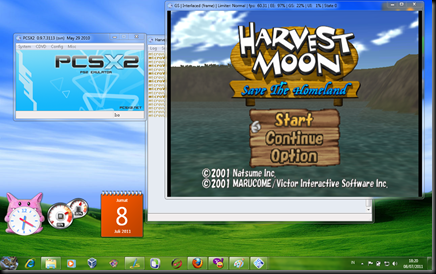
INSTALL PS2 di PC/LAPTOP+GAME Harvest Moon STH Iso | Part 1


Bermain PS2 memang sangatlah menyenangkan, selain bisa menghilangkan stress, juga sangat cocok untuk menghabiskan waktu. tetapi bagaimana jika kita tidak mempunyai mesin PS2?
Sebenarnya, kita bisa menggunakan PC atau laptop kita untuk memainkan game-game PS2. saya sendiri sudah membuktikanya dengan menginstal di laptop dan hasilnya cukup memuaskan. jadi kalau bepergian bawa laptop gitu, bisa sambil maen PS :D
praktis kan, pengen nyoba’in juga? hehehehe

berikut adalah spesifikasi laptop  saya:
- Prossesor core 2 duo
- Ram 2 DDR1 GB
- VGA 256mb
-hardisk SATA 320GB
- OS Win 7 Ultimate

DOWNLOAD FILE

PCSX2+Bios USA

DirectX End-User Runtimes (June 2010)(Untuk Komputer yng No koneksi)
Harvest Moon- Save The Homeland(ISO)

Namun jika komputer anda tidak memenuhi, anda tidak usah putus asa. Coba di instal dulu, tidak ada salahnya kan mencoba :)

ok, sekarang kita mulai instalasinya.
1.download dan Install  DirectX End-User Runtimes (June 2010)Untuk main Di rumah gak pake Koneksi Internet/Klo udah Tersambung Ke internet Centang Aja DirectX Web Setup(recommended) Pada Instalasi PCSX. Tekan Yes Lalu Letakan Di D:\ seperti pada gambar d bwah Ini/Terserah di mana Anda Extract nya.Lalu cari File DirectX yang sudah Di extract tadi.Cari DXSETUP.exe Lalu Install.


2. Lalu Dwnload dan istall PCSX2 
3. klik next lalu halngkan Centang Pada DirectX Web Setup(recommende).Karna Sudah Di install secara Manual.klik instal dan klik close jika proses instalasi sudah selesai
 
 
image
NB: Mungkin pada saat melakukan proses instalasi ini, anda akan diminta mendownload dan menginstal microsoft C++ (jika anda belum memilikinya), oleh karena itu pastikan anda terhubung ke internet jika belum mempunyai microsoft C++ ( proses download dan instalasi akan berjalan secara otomatis jika anda terhubung ke internet, jadi tinggal tekan next dan next saja )
4.buka program PCSX2 yang telah di instal tadi. kurang lebih tampilanya akan jadi seperti ini. biarkan setingganya default dan Pilih Custom Folder, Lalu Next
 

 5.selanjutnya anda akan melihat seperti ini:
image
biarkan saja semua default kecuali PAD, karena settingan default PAD adalah none (tanpa controller). klik Configure untuk mengkonfigurasinya.
Cara mengkonfigurasi:
pada pilihan pad1 atau pad 2, pilih control yang akan di setting dan tekan tombol keyboard apa saja. jadi semisal anda ingin mengkonfigurasi tombol square, klik square dan tekan tombol keyboard apa saja(misal “a”) sehingga controller tombol  square untuk PS2 akan menjadi tombol “a” di keyboard dan seterusnya.
image
setelah mengkonfigurasi, tekan ok dan tekan next untuk melanjutkan
6.hapus tanda centang dan klik browse lalu pilih folder dimana anda meletakkan bios.Dan Letakan File Bios pada Folder Bios Tersebut

7.klik refresh lish dan pilih bios, terakhir klik finish

8.dengan ini proses main setting telah selesai. untuk cara memainkan game setting PCSX agar tidak lemot akan dibahas dalam Bermain PS2 di PC Part 2 KLIK DISINI

Sunday, 3 March 2013

THE SIMS 3 - 70s 80s and 90s Stuff - FLT

Scene group FLT released the expansion The Sims 3: 70s 80s and 90s Stuff for PC :D Adds a lot of "decoration"  to the game, just don’t forget this requires The Sims 3 to be installed. Enjoy guys!

Features:

The Groovy 70s
Fashion — Pump the tunes on your Sims’ stereo system and show off their moves—and their righteous threads. From flared jeans and bellbottoms to halter top catsuits and platforms shoes, your Sims are ready to boogie the night away in style!
Décor — Add some righteous décor to your Sims’ home with a console stereo system, minimalist furnishings, a far out disco ball, and more. Can you dig it?
The Awesome 80s
Fashion — Don some legwarmers, a leotard, and a headband and your Sim is ready to get physical—at the gym, that is! Outfitted in a vibrant structured suit with shoulder pads, they’re set to bound up the career ladder. Whatever their activity, with the awesome 80s attire, they’re dressed for success, for sure!
Décor — Set your Sims up with radical pinup wall art, tubular arcade games, and a, like totally slick entertainment system— and let the shimmies start shaking!
The Grunge 90s
Fashion — Whether your Sims are sporting the anti-fashion grunge look in tattered jeans and layered tops or a casual-chic outfit featuring an asymmetrical handkerchief hemline skirt, they’re sure to get mad props for their 90s fashion sense.
Décor — Drag out the distressed furniture for an industrial metal look that says you don’t care about the establishment—even if secretly you do.
New hairstyles and facial hair – Complete your Sims’ flashback look with new hairstyles from their favorite decade, from the feathered look of the 70s to the poofed tease of the 80s to a lank grunge ‘do of the 90s and more.

Download :

Host : Uploaded
Single Link : http://adfoc.us/7466417376065
Mirror (for Single Link) : http://adf.ly/HlXss
Host : Uploaded
Split Files : http://adf.ly/HlY8F
Mirror (for Split Files) : http://adfoc.us/7466417651028
Password : eagle3zio.blogspot.com

Download Dragon Nest Offline


Download Dragon Nest Offline - Kabar baik untuk kalian semua yang suka main game Dragon Nest ini, biasanya kalian pasti maen game ini secara Online, tp kali ini artikelbebas akan membagikan kepada kalian semua Game Dragon Nest yang versi Offline,  Dragon Nest adalah Game Online buatan korea yang di publikasikan di indonesia oleh Gemscool.com. Game yang bergenre MMOPG ini memang patut di acungi jempol. Dengan jernihnya dan detail graphic nya yang mempesona, para gamers pun tertarik untuk bermain.

Oke kali ini Artikelbebas akan share tentang Game Dragon Nest ini tapi versi Offline

Langsung aja klik tombol download : 


Password rar: eagle3zio.blogspot.com

Saturday, 2 February 2013

Game Point Blank Offline Dari CSCZ


Counter Strike Point Blank Offline - Sobat pasti sudah tidak asing lagi dengan game Point Blank kan???, Nah sekarang game point blank juga ada dalam versi offline yaitu Counter Strike Point Blank. Counter Strike Point Blank adalah game yang mirip dengan Counter Strike dan Point Blank yang sudah tidak asing lagi buat sobat,
[Tutorial]
1.Install Counter Strike CSCZ Setup II.exe
2.Klik Next[Rusia Language] Sampai Installnya Selesai
3.Sesudah Install Akan Diminta Memilih 2 Indikator Pilihan
4.Pilih Yang Kedua
5.Lalu Klik Finish[dalam bahasa Rusia]
6.Open Condition Zero
7.Masukan Kode Lisence Key Yang Ada di Bawah ini
****************
===Lisence Key===
****************

58V2E-CCKCJ-B8VSE-MEW9Y-ACB2K  *
5Z62E-79JDV-79NAM-ZGVE6-ARBWY
5ZN2F-C6NTT-ZPBWP-L2DWQ-Y4B49
5Z62G-79JDV-79NAM-ZQVEB-ARBWY
5ZK2G-79JSD-FFSFD-CF35H-SDF4A
5ZQ2A-NI239-4F4K7-H9N8Q-VTSYT
5ZQ2B-NI239-4F4K7-H9N8Q-VTSYT
5ZQ2A-NI236-4F4K7-H9N8Q-VTSYT
5ZQ2A-NI236-4F4KY-H9N8Q-VTSYT
5ZN2F-C6NTT-ZPBWP-L2DWW-Y4B49
5ZN2F-C6NTT-ZPBWP-L2DWY-Y4B49
5ZN2F-C6NTT-ZPBWP-L2DWS-Y4B49
5ZN2F-C6NTT-ZPBWP-L2DW3-Y4B49
5ZN2F-C6NTT-ZPBWP-W2DW3-D4B49
5ZN2F-C6NTT-ZPBWP-W2DW3-C4B49
5ZN2E-C6NTT-ZPBWP-W2DW3-D4B49
5ZN2F-C6NTT-ZPBWP-W2DW3-D4B49
5ZN2F-C6NTQ-ZPBWP-W2DW3-C4B49
5ZN2F-C6NTR-ZPBWP-W2DW3-C4B49
5ZN2F-C6NTY-ZPBWP-W2DW3-C4B49
5ZN2F-C6NTS-ZPBWP-W2DW3-C4B49
5ZN2F-C6NTS-QPBWP-W2DW3-C4B49
5ZN2F-C6NTS-QPBWP-I2DW3-C4B49
5ZN2F-C6NTS-QPBWP-I2DW3-D4B49
5ZN2F-C6NTS-QPBWP-I2DW3-C4B49
0ZN2F-C6NTS-QPBWP-I2DW3-C4B49
6ZN2F-C6NTS-QPBWP-I2DW3-C4B49
5QN2F-C6NTS-QPBWP-I2DW3-C4B49

8.Lalu Keluar lagi
9.Install CSPB Yang Saya Punya
10.Pilih Accept Sampe Install Selesai Dan Icon PB akan di Buat D Desktop Otomatis Game Akan Dimulai
11.Hapus lah Dua Shortcut Condition Zero dan Counter Strike
12.Jadi Anda Telah Memiliki Game PB Offline Secara Permannent :D
Happy Have Fun :D
 Penasaran dengan game Counter Strike Point Blank langsung saja Download Game Counter Strike Point Blank di bawah ini.


SIZE 60MB

SIZE 330MB


Tuesday, 31 January 2012

CARA MAIN PS2 di PC (100% Berhasil) Part 2

Artikle ini di buat untuk menyambung postingan saya mengenai cara bermain PS2 di PC (100% berhasil) Part 1. langsung aja yuks, ikuti  cara-cara berikut ini untuk menjalankan game PS2 di komputer.
Sebelumnya, saya asumsikan bahwa anda semua telah membaca dan mengikuti semua yang ada di postingan saya sebelumnya tentang cara bermain PS2 di PC (100% berhasil) PArt 1 dengan benar.
image

  • Menjalankan game PS2 dengan media DVD ROM/RW
Secara umum, bermain PS2 itu menggunakan kepingan kaset game. nah, untuk menggunakan PCSX ini juga dibutuhkan kepingan kaset game yang dimaukkan ke DVD ROM/RW.
    1.buka software PCSX2
2.pilih menu CDDVD, arahkan menu ke plugin menu dan klik menu setting (sebelumnya klik plugin pada menu CDDVD agar PCSX melakukan boot melalui DVD R/RW)
image

3.pilih direktori DVD ROM/RW anda
image
4.masukkan DVD Game anda, lalu klik system dan klik boot CDDVD (fast). selesai :)
image


    • Menjalankan game PS2 dengan media ISO
      Jika anda ragu-ragu untuk menggunakan DVD ROM/RW anda dikarenakan takut akan memperpendek umur DVD ROM/RW, anda bisa merubahnya dulu menjadi iso file. anda bisa googling jika tidak tahu apa itu iso.
      1.pertama-tama, anda harus merubah DVD game tersebut menjadi iso file. anda bisa menggunakan tool-tool gratisan seperti ultra iso atau magic iso.
      2.klik CDDVD, arahkan kursor ke iso selector dan klik browse (sebelumnya klik iso pada menu CDDVD agar PCSX melakukan boot melalui iso file)
image
      3.pilih letak dimana anda menyimpan iso DVD game dan klik buka
    image
    4.terakhir klik klik system dan klik boot CDDVD (fast). selesai:)
    image

    Pertanyaan-pertanyaan umum
    X:apakah beresiko bagi komputer kita jika menggunakan software ini?
    Y:saya rasa tidak, selama anda menggunakan iso file. karena jika anda menggunakan mesia DVD RW, resiko kerusakan optik sangatlah besar. maka dari itu saya sarankan untuk mengubah ke bentuk iso terlebih dahulu

    X:saya sudah mencobanya, tapi hasilnya tidak memuaskan dikarenakan sangat lambat.
    Y:kalau anda merasa lambat, anda bisa menggunakan speed hack. caranya masuk ke cinfig lalu klik emulating setting. setelah itu masuk ke speed hack, centang “enable speedhack” dan centang semua yang di recomended. untuk lebih jelasnya perhatikan gambar berikut:
    image
    tapi jika masih lemot juga, ubah settinganya seperti gambar berikut:
    image
    di jamin gak bakal lemot deh :)